Decouple Your Teams with Synchronous Nexus Operations
Author: Nikolay Advolodkin | Editor: Angela Zhou
In this walkthrough, you'll take a monolithic Temporal application — where Payments and Compliance share a single Worker — and split it into two independently deployable services connected through Temporal Nexus.
You'll define a shared service contract, implement a synchronous Nexus handler, and rewire the caller — all while keeping the exact same business logic and workflow behavior. By the end, you'll understand how Nexus lets teams decouple without sacrificing durability.
Prerequisites
Before you begin this walkthrough, ensure you have:
- Knowledge of Java
- Knowledge of Temporal including Workflows, Activities, and Workers
- Clone this repository
Scenario
You work at a bank where every payment flows through three steps:
- Validate the payment (amount, accounts)
- Check compliance (risk assessment, sanctions screening)
- Execute the payment (call the gateway)
Two teams split this work:
| Team | Owns | Task Queue |
|---|---|---|
| Payments | Steps 1 & 3 — validate and execute | payments-processing |
| Compliance | Step 2 — risk assessment & regulatory checks | compliance-risk |
The Problem
Right now, both teams' code runs on the same Worker. One process. One deployment. One blast radius.
That's a problem because the Compliance team deals with sensitive regulatory work — OFAC sanctions screening, anti-money laundering (AML) monitoring, risk decisions — that requires stricter access controls, separate audit trails, and its own release cycle. Payments has none of those constraints. But because both teams share a single process, they're forced into the same failure domain, the same security perimeter, and the same deploy pipeline.
In practice, that shared fate plays out like this: Compliance ships a bug at 3 AM. Their code crashes. But it's running on the Payments Worker — so Payments goes down too. Same blast radius. Same 3 AM page. Two teams, one shared fate.
The obvious fix is splitting them into microservices with REST calls. But that introduces a new problem: if Compliance is down when Payments calls it, the request is lost. No retries. No durability. You're writing your own retry loops, circuit breakers, and dead letter queues. You've traded one problem for three.
The Solution: Temporal Nexus
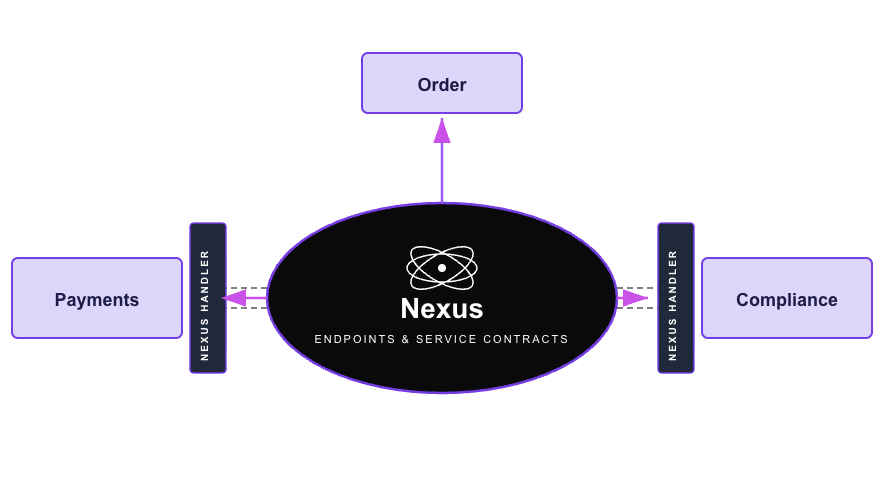
Nexus gives you team boundaries with durability. Each team gets its own Worker, its own deployment pipeline, its own security perimeter, its own blast radius — while Temporal manages the durable, type-safe calls between them.
The Payments workflow calls the Compliance team through a Nexus operation. If the Compliance Worker goes down mid-call, the payment workflow just...waits. When Compliance comes back, it picks up exactly where it left off. No retry logic. No data loss. No 3am page for the Payments team.
The best part? The code change is almost invisible:
// BEFORE (monolith — direct activity call):
ComplianceResult compliance = complianceActivity.checkCompliance(compReq);

// AFTER (Nexus — durable cross-team call):
ComplianceResult compliance = complianceService.checkCompliance(compReq);
Same method name. Same input. Same output. Completely different architecture.
Overview
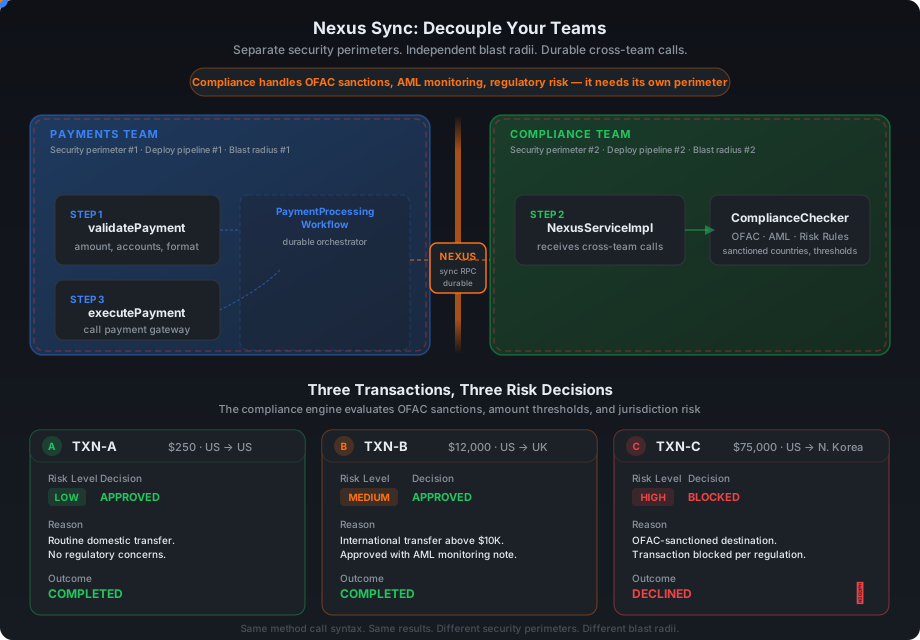
The Payments team owns validation and execution (left). The Compliance team owns risk assessment, isolated behind a Nexus boundary (right). Data flows left-to-right — and if the Compliance side goes down mid-check, the payment resumes when it comes back.
Interactive version: Open
nexus-decouple.htmlin your browser to toggle between Monolith and Nexus modes with animated data flow.
What You'll Build
You'll start with a monolith where everything — the payment workflow, payment activities, and compliance checks — runs on a single Worker. By the end, you'll have two independent Workers: one for Payments and one for Compliance, communicating through a Nexus boundary.
BEFORE (Monolith):                    AFTER (Nexus Decoupled):
┌─────────────────────────┐           ┌──────────────┐    ┌──────────────┐
│   Single Worker         │           │  Payments    │    │  Compliance  │
│   ─────────────         │           │  Worker      │    │  Worker      │
│   Workflow              │           │  ──────      │    │  ──────      │
│   PaymentActivity       │    →      │  Workflow    │◄──►│  NexusHandler│
│   ComplianceActivity    │           │  PaymentAct  │    │  Checker     │
│                         │           │              │    │              │
│   ONE blast radius      │           │  Blast #1    │    │  Blast #2    │
└─────────────────────────┘           └──────────────┘    └──────────────┘
                                              ▲ Nexus ▲
Checkpoint 0: Run the Monolith
Before changing anything, let's see the system working. Open the repository you've cloned, then open 3 terminal windows and a running Temporal server.
Terminal 0 — Temporal Server (if not already running):
temporal server start-dev
Terminal 1 — Start the monolith worker:
cd exercise-1300a-nexus-sync/exercise
mvn compile exec:java@payments-worker
You should see:
Payments Worker started on: payments-processing
Registered: PaymentProcessingWorkflow, PaymentActivity
            ComplianceActivity (monolith — will decouple)
Terminal 2 — Run the starter. The starter kicks off three executions of the same PaymentProcessingWorkflow — each with a different transaction that exercises a different risk level:
cd exercise-1300a-nexus-sync/exercise
mvn compile exec:java@starter
You'll see three completed executions of the PaymentProcessingWorkflow:
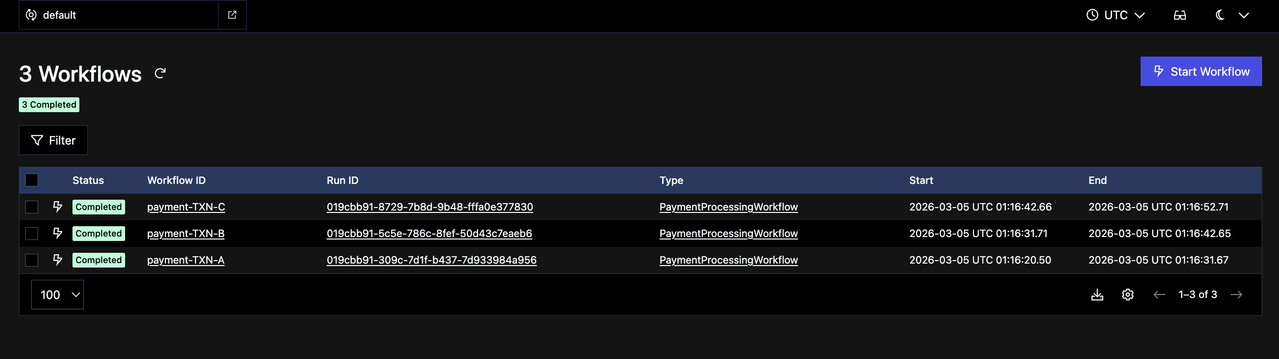
Expected results:
| Transaction | Amount | Route | Risk | Result |
|---|---|---|---|---|
TXN-A | $250 | US → US | LOW | COMPLETED |
TXN-B | $12,000 | US → UK | MEDIUM | COMPLETED |
TXN-C | $75,000 | US → North Korea | HIGH | DECLINED_COMPLIANCE |
Checkpoint 0 passed if all 3 transactions complete with the expected results. The system works! Now let's decouple it.
Stop the Worker (Ctrl+C in Terminal 1) before continuing.
Nexus Building Blocks
Before diving into code, here's a quick map of the 4 Nexus concepts you'll encounter:
Endpoint    →    Registry    →    Service    →    Operation
(phone #)        (phone book)     (department)    (specific request)
- Nexus Endpoint — A named entry point that routes requests to the right Namespace and Task Queue, so the caller doesn't need to know where the handler lives
- Nexus Registry — The directory where all Endpoints are registered
- Nexus Service — A named collection of operations — the contract between teams (e.g., the
ComplianceNexusServiceinterface) - Nexus Operation — A single callable method on a Service, marked with
@Operation(e.g.,checkCompliance)
In this exercise, you'll create an Endpoint in the Registry (Checkpoint 0.5) and define a Service with Operations (TODOs 1-2). The caller dials the Endpoint name — Temporal routes the rest.
Your 5-Step Decoupling Plan
In this exercise, you're going to pull Compliance out of the Payments Worker and into its own independent Worker, connected through a Nexus boundary. Steps 1-3 build the Compliance side (contract, handler, Worker), and steps 4-5 rewire the Payments side to call it through Nexus instead of a local Activity.
| # | File | Action | Key Concept |
|---|---|---|---|
| 1 | shared/nexus/ComplianceNexusService.java | Create | Shared contract between teams |
| 2 | compliance/temporal/ComplianceNexusServiceImpl.java | Create | Compliance handles incoming Nexus calls |
| 3 | compliance/temporal/ComplianceWorkerApp.java | Create | Compliance gets its own worker |
| 4 | payments/temporal/PaymentProcessingWorkflowImpl.java | Modify | One-line swap changes the architecture |
| 5 | payments/temporal/PaymentsWorkerApp.java | Modify | Payments points to the new endpoint |
Checkpoint 0.5: Create the Nexus Endpoint
Before implementing the TODOs, register a Nexus endpoint with Temporal. This creates the routing rule that connects the endpoint name (compliance-endpoint) to the Compliance Worker's task queue (compliance-risk) — without it, the Payments workflow has no way to reach the Compliance side.
temporal operator nexus endpoint create \
  --name compliance-endpoint \
  --target-namespace default \
  --target-task-queue compliance-risk
You should see:
Endpoint compliance-endpoint created.
Analogy: This is like adding a contact to your phone. The endpoint name is the contact name; the task queue is the phone number. You only do this once.
TODO 1: Create the Nexus Service Interface
File: shared/nexus/ComplianceNexusService.java
This is the shared contract between teams — like an OpenAPI spec, but durable. Both teams depend on this interface; neither needs to know about the other's internals.
What to add:
@Serviceannotation on the interface — marks this as a Nexus service that Temporal can discover and route to- One method:
checkCompliance(ComplianceRequest) → ComplianceResult— the single operation the Compliance team exposes @Operationannotation on that method — marks it as a callable Nexus operation (a service can have multiple operations, but we only need one here)
Look in the solution directory if you need a hint.
Pattern to follow:
@Service
public interface ComplianceNexusService {
    @Operation
    ComplianceResult checkCompliance(ComplianceRequest request);
}
Tip: The @Service and @Operation annotations come from io.nexusrpc, NOT from io.temporal. Nexus is a protocol — Temporal implements it, but the interface annotations are protocol-level.
TODO 2: Implement the Nexus Handler
File: compliance/temporal/ComplianceNexusServiceImpl.java
This is the waiter that takes orders from the Payments team and passes them to the chef (ComplianceChecker).
Two new annotations:
@ServiceImpl(service = ComplianceNexusService.class)— goes on the class; tells Temporal "this is the implementation of the contract from TODO 1"@OperationImpl— goes on each handler method; pairs it with the matching@Operationin the interface
What to implement:
- Add
@ServiceImplannotation pointing to the interface - Add a
ComplianceCheckerfield and accept it via constructor — the handler receives requests but delegates the actual work to the checker - Create a
checkCompliance()method that returnsOperationHandler<ComplianceRequest, ComplianceResult>— this is Nexus's wrapper type that lets Temporal handle retries, timeouts, and routing for you - Inside that method, return
WorkflowClientOperationHandlers.sync((ctx, details, client, input) -> checker.checkCompliance(input))—syncmeans the operation runs inline and returns a result right away, as opposed toasyncwhich would kick off a full workflow (you'll see that in a later exercise).
Key insight: The handler method name must exactly match the interface method name. checkCompliance in the interface = checkCompliance() in the handler. Temporal matches by name.
Common trap: Don't write class ComplianceNexusServiceImpl implements ComplianceNexusService. The handler does not implement the interface — the signatures are completely different. The interface method returns ComplianceResult, but the handler method returns OperationHandler<ComplianceRequest, ComplianceResult>. The link between them is the @ServiceImpl annotation, not Java's implements.
Quick Check
What does @ServiceImpl(service = ComplianceNexusService.class) tell Temporal?
@ServiceImpl links the handler class to its Nexus service interface. Temporal uses this to route incoming Nexus operations to the correct handler.
Why does checkCompliance() return OperationHandler<ComplianceRequest, ComplianceResult> instead of returning ComplianceResult directly?
The method returns an OperationHandler — a description of how to process the operation (sync vs async, which lambda to run). Temporal calls this handler when a request arrives. Think of it as returning a recipe, not the meal.
TODO 3: Create the Compliance Worker
File: compliance/temporal/ComplianceWorkerApp.java
Standard CRAWL pattern with one new step:
C — Connect to Temporal
R — Register (no workflows in this Worker)
A — Activities (none — logic lives in the Nexus handler)
W — Wire the Nexus service implementation  ← NEW
L — Launch
The key new method:
worker.registerNexusServiceImplementation(
    new ComplianceNexusServiceImpl(new ComplianceChecker())
);
Compare to what you already know:
// Activities (you've done this before):
worker.registerActivitiesImplementations(...)

// Nexus (new — same shape, different method name):
worker.registerNexusServiceImplementation(...)
Task queue: "compliance-risk" — must match the --target-task-queue from the CLI endpoint creation.
Checkpoint 1: Compliance Worker Starts
cd exercise-1300a-nexus-sync/exercise
mvn compile exec:java@compliance-worker
Checkpoint 1 passed if you see:
Compliance Worker started on: compliance-risk
If it fails to compile, check:
TODO 1: DoesComplianceNexusServicehave@Serviceand@Operation?TODO 2: DoesComplianceNexusServiceImplhave@ServiceImpland@OperationImpl?TODO 3: Are you connecting to Temporal and registering the Nexus service?
Keep the compliance Worker running — you'll need it for Checkpoint 2.
TODO 4: Replace Activity Stub with Nexus Stub
File: payments/temporal/PaymentProcessingWorkflowImpl.java
This is the key teaching moment. Instead of calling compliance as a local Activity (which runs on the same Worker), you'll call it through a Nexus service stub (which routes the request across the Nexus boundary to the Compliance Worker). The workflow code barely changes — you're swapping how the call is routed, not what is being called.
BEFORE — local Activity call (runs on this Worker):
private final ComplianceActivity complianceActivity =
    Workflow.newActivityStub(ComplianceActivity.class, ACTIVITY_OPTIONS);

// In processPayment():
ComplianceResult compliance = complianceActivity.checkCompliance(compReq);
AFTER — Nexus call (routes to the Compliance Worker):
private final ComplianceNexusService complianceService = Workflow.newNexusServiceStub(
    ComplianceNexusService.class,
    NexusServiceOptions.newBuilder()
        .setOperationOptions(NexusOperationOptions.newBuilder()
            .setScheduleToCloseTimeout(Duration.ofMinutes(2))
            .build())
        .build());

// In processPayment():
ComplianceResult compliance = complianceService.checkCompliance(compReq);
The scheduleToCloseTimeout is how long the workflow is willing to wait for the Nexus operation to complete. If the Compliance Worker is slow or down, the workflow waits up to this limit before failing. Think of it like the Activity startToCloseTimeout, but for cross-boundary calls.
What changed:
| Before (Monolith) | After (Nexus) |
|---|---|
Workflow.newActivityStub() | Workflow.newNexusServiceStub() |
ComplianceActivity.class | ComplianceNexusService.class |
ActivityOptions | NexusServiceOptions + scheduleToCloseTimeout |
complianceActivity. | complianceService. |
What stayed the same:
.checkCompliance(compReq)— identical callComplianceResult— same return type- All surrounding logic — untouched
Where does the endpoint come from? Not here! The workflow only knows the service (
ComplianceNexusService). The endpoint ("compliance-endpoint") is configured in the worker (TODO 5). This keeps the workflow portable.
TODO 5: Update the Payments Worker
File: payments/temporal/PaymentsWorkerApp.java
Two changes:
CHANGE 1: Register the workflow with NexusServiceOptions:
worker.registerWorkflowImplementationTypes(
    WorkflowImplementationOptions.newBuilder()
        .setNexusServiceOptions(Collections.singletonMap(
            "ComplianceNexusService",      // interface name (no package)
            NexusServiceOptions.newBuilder()
                .setEndpoint("compliance-endpoint")  // matches CLI endpoint
                .build()))
        .build(),
    PaymentProcessingWorkflowImpl.class);
CHANGE 2: Remove ComplianceActivityImpl registration:
// DELETE these lines:
ComplianceChecker checker = new ComplianceChecker();
worker.registerActivitiesImplementations(new ComplianceActivityImpl(checker));
Analogy: You're removing the compliance department from your building and adding a phone extension to their new office. The workflow dials the same number (
checkCompliance), but the call now routes across the street.
Checkpoint 2: Full Decoupled End-to-End
You need 4 terminal windows now:
Terminal 0: Temporal server (already running)
Terminal 1 — Compliance worker (already running from Checkpoint 1, or restart):
cd exercise-1300a-nexus-sync/exercise
mvn compile exec:java@compliance-worker
Terminal 2 — Payments worker (restart with your changes):
cd exercise-1300a-nexus-sync/exercise
mvn compile exec:java@payments-worker
Terminal 3 — Starter:
cd exercise-1300a-nexus-sync/exercise
mvn compile exec:java@starter
Checkpoint 2 passed if you get the exact same results as Checkpoint 0:
| Transaction | Risk | Result |
|---|---|---|
TXN-A | LOW | COMPLETED |
TXN-B | MEDIUM | COMPLETED |
TXN-C | HIGH | DECLINED_COMPLIANCE |
Same results, completely different architecture. Two workers, two blast radii, two independent teams.
What just happened at runtime? Your Payments workflow scheduled a Nexus operation → Temporal looked up compliance-endpoint in the Registry → routed the request to the compliance-risk task queue → the Compliance worker picked up the Nexus task, ran checkCompliance(), and returned the result → Temporal recorded it in the caller's workflow history. All durable, all automatic.
Check the Temporal UI at http://localhost:8233. Open any completed workflow's Event History. You'll see two new event types that weren't there in Checkpoint 0:
NexusOperationScheduled— the workflow asked Temporal to route a callNexusOperationCompleted— the result came backNotice there's no
NexusOperationStartedevent. That's because this is a sync operation — it ran inline and returned immediately. In the next exercise (async), you'll see all three events.

Victory Lap: Durability Across the Boundary
This is where it gets fun. Let's prove that Nexus is durable — not just a fancy RPC.
- Start both workers (if not already running)
- Run the starter in another terminal
- While TXN-B is processing, kill the compliance worker (Ctrl+C in Terminal 1)
- Watch the payment workflow pause — it's waiting for the Nexus operation to complete
- Restart the compliance worker
- Watch the payment workflow resume and complete
The payment workflow didn't crash. It didn't timeout. It didn't lose data. It just... waited. Because Temporal + Nexus handles this automatically.
Try this with REST: Kill the compliance service mid-request. What happens? Connection reset. Transaction lost. 3am page. With Nexus, the workflow simply picks up where it left off.
Bonus Exercise: What Happens When You Wait Too Long?
You saw the workflow wait for the compliance worker to come back. But what if it never comes back?
Try this:
- Start both Workers and the Starter
- Kill the compliance Worker while a transaction is processing
- Don't restart it. Wait and watch the Temporal UI at http://localhost:8233
What eventually happens to the payment Workflow?
The Nexus operation fails with a SCHEDULE_TO_CLOSE timeout after 2 minutes. The workflow's catch block handles it — the payment gets status FAILED instead of hanging forever.
This is the scheduleToCloseTimeout you set in TODO 4:
NexusOperationOptions.newBuilder()
    .setScheduleToCloseTimeout(Duration.ofMinutes(2))
The lesson: Nexus gives you durability, not infinite patience. You control how long the workflow is willing to wait. In production, you'd set this based on your SLA — maybe 30 seconds for a real-time payment, or 24 hours for a batch compliance review.
Quiz
Where is the Nexus endpoint name (compliance-endpoint) configured?
In PaymentsWorkerApp, via NexusServiceOptions → setEndpoint("compliance-endpoint"). The workflow only knows the service interface. The worker knows the endpoint. This separation keeps the workflow portable.
What happens if the Compliance worker is down when the Payments workflow calls checkCompliance()?
The Nexus operation will be retried by Temporal until the scheduleToCloseTimeout expires (2 minutes in our case). If the Compliance worker comes back within that window, the operation completes successfully. The Payment workflow just waits — no crash, no data loss.
What's the difference between @Service/@Operation and @ServiceImpl/@OperationImpl?
@Service/@Operation(fromio.nexusrpc) go on the interface — the shared contract both teams depend on@ServiceImpl/@OperationImpl(fromio.nexusrpc.handler) go on the handler class — the implementation that only the Compliance team owns
Think of it as: the interface is the menu (shared), the handler is the kitchen (private).
What if ComplianceChecker.checkCompliance() throws an exception instead of returning approved=false?
The Nexus Machinery treats unknown errors as retryable by default. It will automatically retry the operation with backoff until the scheduleToCloseTimeout (2 minutes) expires. If you want to fail immediately (no retries), throw a non-retryable ApplicationFailure. Same principle as Activities, but with a built-in retry policy you don't configure yourself.
What's Next?
You've just learned the fundamental Nexus pattern: same method call, different architecture.
From here you can explore async Nexus handlers using fromWorkflowMethod() — where the Compliance side starts a full Temporal workflow instead of running inline. That's where Nexus truly shines: long-running, durable operations across team boundaries. See the Nexus documentation to go deeper.
Sign up here to get notified when we drop new educational content!